Apple’s MacBook lineup keeps getting faster and more powerful, but one thing still frustrates many users in 2026: limited ports. Whether you own a MacBook Air M4, MacBook Pro M4 Pro, or an older M-series Mac, chances are you still need more connectivity for monitors, SSDs, SD cards, Ethernet, cameras, microphones, or external displays.
That’s where a great USB-C hub or Thunderbolt docking station becomes essential.
In this guide, we tested and researched the best USB-C hubs and docking stations for MacBook in 2026 based on:
- Port selection
- Thunderbolt 4/5 performance
- Charging power
- Display support
- Build quality
- Mac compatibility
- Real-world reliability
- Value for money
According to recent expert testing from Macworld, PCWorld, Wired, and other reviewers, premium docks like the CalDigit TS5 Plus and modern Thunderbolt 5 hubs are leading the market in 2026.
Quick Picks: Best USB-C Hubs & Docks for MacBook
| Category | Product | Best For | Price |
|---|---|---|---|
| Best Overall Dock | CalDigit TS5 Plus | Power users & creators | ~$499 |
| Best Thunderbolt 4 Dock | CalDigit TS4 | Professional workflows | ~$399 |
| Best Value Dock | UGREEN Revodok Max | Performance + affordability | ~$299 |
| Best Portable Hub | Satechi USB-C Pro Hub | Travel & remote work | ~$99 |
| Best Budget Hub | Anker 565 USB-C Hub | Everyday MacBook users | ~$69 |
| Best Premium TB5 Dock | Anker Prime TB5 Dock | Future-proof setups | ~$399 |
| Best Compact Thunderbolt Hub | Satechi Thunderbolt 4 Slim Hub Pro | Minimalist desks | ~$199 |
| Best Multi-Monitor Dock | Belkin Thunderbolt 4 Core Hub | Dual display users | ~$179 |
Why MacBook Users Need a USB-C Hub in 2026
Modern MacBooks are thinner than ever, but Apple continues to minimize port selection. Even premium MacBook Pro models rely heavily on USB-C and Thunderbolt ports.
A quality docking station can instantly transform your MacBook into a full workstation by adding:
- HDMI or DisplayPort outputs
- SD and microSD card readers
- USB-A ports
- Ethernet
- Audio jacks
- Fast charging
- External SSD support
- Multi-monitor capability
This is especially important because Apple Silicon Macs still have unique external display limitations on some base chips.
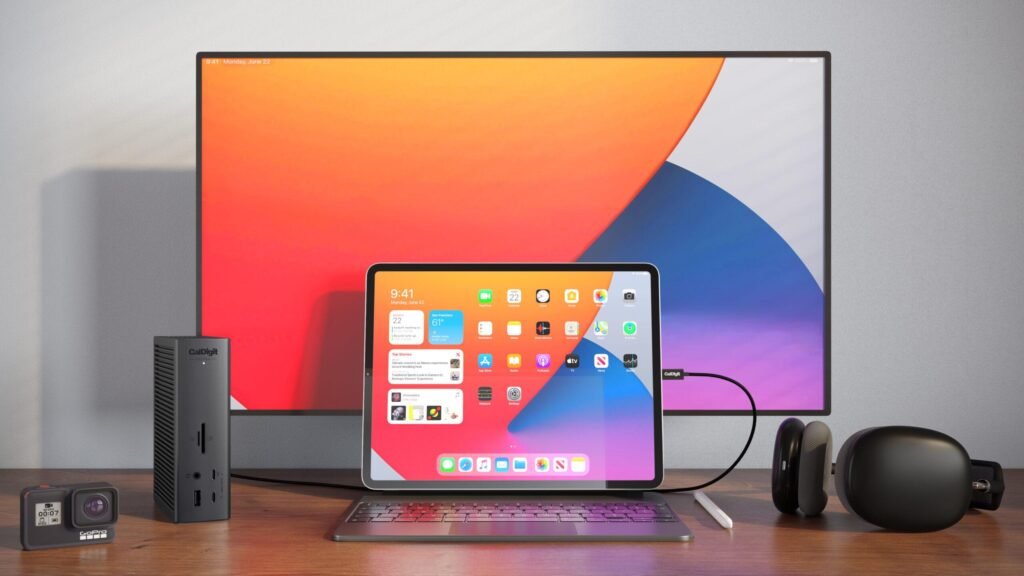
Best Overall USB-C Dock for MacBook: CalDigit TS5 Plus
CalDigit TS4 Thunderbolt 4 18-In-1 Hub


Price: Around $499
The CalDigit TS5 Plus is widely considered the ultimate docking station for MacBook users in 2026. Multiple expert reviews have ranked it as the best premium Thunderbolt dock currently available.
This dock is designed for professionals who need maximum connectivity and top-tier performance.
Key Features
- Thunderbolt 5 support
- Up to 140W charging
- 15+ ports
- 10Gb Ethernet
- Multiple 8K display support
- High-speed external SSD support
- Premium aluminum construction
Why It’s Great for MacBook
If you use your MacBook for:
- Video editing
- Music production
- Photography
- Software development
- Trading setups
- Multi-monitor workflows
…the TS5 Plus is nearly unbeatable.
Its biggest advantage is bandwidth. Thunderbolt 5 dramatically improves data transfer and external display capabilities compared to older Thunderbolt 4 docks.
Pros
- Exceptional build quality
- Massive port selection
- Excellent thermal management
- Extremely reliable
- Future-proof
Cons
- Expensive
- Overkill for casual users
- Large power brick
Best Thunderbolt 4 Dock: CalDigit TS4
CalDigit TS4 Thunderbolt 4 18-In-1 Hub


Price: Around $399
Even in 2026, the CalDigit TS4 remains one of the best Thunderbolt 4 docks ever made.
Macworld, Laptop Mag, and Windows Central continue recommending it because of its stability and versatility.
Ports Included
- Thunderbolt 4 ports
- USB-C
- USB-A
- SD & microSD
- Ethernet
- DisplayPort
- Audio in/out
Why Mac Users Love It
The TS4 simply works flawlessly with macOS. It’s reliable under heavy workloads and handles demanding peripherals with ease.
It’s perfect for creators who want:
- Stable dual monitor support
- Fast SSD performance
- Professional audio interfaces
- Ethernet reliability
Best For
- Creative professionals
- Studio setups
- Home offices
- Power users
Best Value Docking Station: UGREEN Revodok Max
UGREEN Revodok Max U708 8-in-1 Thunderbolt 4 Docking Station


Price: Around $299
UGREEN has become one of the fastest-growing accessory brands in the Apple ecosystem, and the Revodok lineup is genuinely impressive.
Recent reviews praised the Revodok Max for balancing price, performance, and design.
What Makes It Stand Out
- Thunderbolt 4/5 support
- Excellent value
- Compact design
- Fast data speeds
- Great thermals
- Creator-friendly ports
Ideal Users
- Content creators
- Students
- Hybrid workers
- MacBook Air users
Pros
- Strong performance for the price
- Sleek aluminum design
- Reliable charging
- Excellent port variety
Cons
- Fewer premium features than CalDigit
- Some models lack HDMI
Best Portable USB-C Hub: Satechi USB-C Pro Hub
Satechi USB C Hub Pro 7-In-1 Adapter


Price: Around $99
Satechi products feel like they were designed by Apple itself.
The USB-C Pro Hub is compact, elegant, and ideal for MacBook users who travel frequently.
Features
- 4K HDMI
- USB-A ports
- SD/microSD readers
- USB-C pass-through charging
- Slim portable design
Best For
- Students
- Travelers
- Coffee shop workers
- Minimal desk setups
MacBook Air owners especially love this hub because it maintains portability while adding essential connectivity.
Reddit users frequently recommend Satechi hubs for their aesthetics and Mac compatibility.
Best Budget USB-C Hub: Anker 565 USB-C Hub
Anker USB-C Hub 5-In-1 4K30Hz HDMI 100W Max Power Delivery


Price: Around $69
Anker continues dominating the USB-C hub market because of its strong reliability and affordable pricing.
Macworld specifically highlighted the Anker 565 as one of the best mainstream USB-C hubs for Mac users.
Why It’s Popular
- Affordable
- Reliable
- Lightweight
- Good port variety
- 10Gbps speeds
Ports
- HDMI
- USB-A
- USB-C
- Ethernet
- SD card reader
- Audio jack
Best For
- Everyday MacBook users
- Students
- Office work
- Casual creators
This is the hub most people should buy if they simply need more ports without spending hundreds of dollars.
Best Premium Thunderbolt 5 Dock: Anker Prime TB5
Anker USB-C Hub 5-In-1 4K30Hz HDMI 100W Max Power Delivery


Price: Around $399
The Anker Prime TB5 Dock is one of the most exciting releases in the Thunderbolt 5 era.
The Verge and Creative Bloq both praised it for bringing desktop-grade connectivity into a compact design.
Key Highlights
- Built-in GaN power supply
- 14 ports
- Thunderbolt 5
- HDMI + DisplayPort
- 140W charging
- Dual 8K display support
Why It’s Impressive
Unlike many competing docks, the Anker Prime TB5 has an internal power supply, reducing desk clutter significantly.
It’s ideal for:
- Advanced creators
- Future-proof setups
- Heavy multitasking
- High-end MacBook Pro users
Best Compact Thunderbolt Hub: Satechi Thunderbolt 4 Slim Hub Pro
Satechi Thunderbolt 4 Slim Hub Pro


Price: Around $199
If you hate bulky docking stations, this is one of the best options available.
PCWorld specifically recommended the Satechi Thunderbolt 4 Slim Hub Pro for users who need compact Thunderbolt expansion.
Features
- Slim design
- Multiple Thunderbolt 4 ports
- USB-A support
- High-speed charging
- Great Mac aesthetics
Perfect For
- Minimalist setups
- Small desks
- Mac mini users
- Portable workstations
Best Dock for Multi-Monitor MacBook Setups: Belkin Thunderbolt 4 Core Hub
Belkin 5-in-1 Thunderbolt 4 Core Hub Docking Stations


Price: Around $179
Belkin has always worked closely with Apple products, and its Thunderbolt 4 Core Hub is excellent for multi-display users.
Why It’s Great
- Reliable display support
- Strong compatibility
- Compact footprint
- Thunderbolt 4 speeds
Best For
- Dual monitor users
- Productivity setups
- Office workers
- Professionals
USB-C Hub vs Docking Station: What’s the Difference?
Many people confuse hubs and docking stations, but they serve different purposes.
| Feature | USB-C Hub | Docking Station |
|---|---|---|
| Size | Small | Larger |
| Power | Lower | Higher |
| Ports | Basic | Extensive |
| Displays | Usually 1 | Multiple |
| Performance | Moderate | High |
| Best For | Travel | Desk setups |
Choose a USB-C Hub If:
- You travel often
- You want portability
- You need only basic ports
- You use a MacBook Air
Choose a Docking Station If:
- You use multiple monitors
- You work from a desk daily
- You need maximum performance
- You transfer huge files
Important Features to Look for in 2026
1. Thunderbolt 4 or Thunderbolt 5
Thunderbolt 5 is becoming the new premium standard in 2026.
Benefits include:
- Higher bandwidth
- Faster SSD performance
- Better multi-display support
- Future-proofing
However, Thunderbolt 4 is still excellent for most users.
2. Power Delivery
Always check charging support.
Some hubs advertise 100W charging but deliver less because the hub itself consumes power.
For MacBook Pro users:
- Aim for 100W+ charging
For MacBook Air:
- 60W is usually enough
3. Display Support
MacBooks have unique external monitor limitations depending on the chip.
Before buying:
- Verify dual monitor compatibility
- Check DisplayLink support if needed
- Confirm refresh rate support
4. Port Selection
Essential ports for most users:
- HDMI
- USB-A
- USB-C
- SD card
- Ethernet
Professional users may also need:
- 10Gb Ethernet
- DisplayPort
- Audio interfaces
- Extra Thunderbolt ports
Best USB-C Hubs by User Type
Best for Students
- Anker 565
- Satechi Pro Hub
Best for Video Editors
- CalDigit TS5 Plus
- CalDigit TS4
Best for Travel
- Satechi USB-C Pro Hub
Best for Budget Buyers
- Anker 565
Best for Creators
- UGREEN Revodok Max
- Anker Prime TB5
Common Mistakes to Avoid
Buying Cheap No-Name Hubs
Low-quality hubs often:
- Overheat
- Disconnect randomly
- Damage SSD speeds
- Cause charging issues
Stick to trusted brands.
Ignoring Mac Display Limitations
Many buyers assume all docks support dual displays on every MacBook.
That’s not true.
Always verify compatibility with your specific MacBook chip.
Choosing USB-C Instead of Thunderbolt
Cheap USB-C hubs can bottleneck:
- SSD speeds
- Displays
- External GPUs
- High-performance workflows
If you’re a professional user, Thunderbolt is worth the investment.
Are Thunderbolt 5 Docks Worth It in 2026?
For casual users:
Probably not.
For professionals:
Absolutely yes.
Thunderbolt 5 is ideal for:
- 8K workflows
- High-speed storage
- Multiple monitors
- Advanced editing
But most MacBook Air users will still be perfectly happy with a quality Thunderbolt 4 or USB-C hub.
Best USB-C Hubs & Docking Stations Comparison Table
| Feature | CalDigit TS4 Thunderbolt 4 18-In-1 Hub₹59,512.43•amazon.in + others | UGREEN Revodok Max U708 8-in-1 Thunderbolt 4 Docking Station₹24,500•tpstech.in + others | Satechi USB C Hub Pro 7-In-1 Adapter₹13,505•Tanotis India + others | Satechi Thunderbolt 4 Slim Hub Pro₹32,850•Tanotis India + others | Belkin 5-in-1 Thunderbolt 4 Core Hub Docking Stations₹19,999•Amazon.in + others |
|---|---|---|---|---|---|
| Best For | Professionals | Creators | Travel | Compact setups | Multi-monitor |
| Thunderbolt Support | TB4 | TB4 | No | TB4 | TB4 |
| Charging | 98W | 100W | 100W pass-through | 96W | 96W |
| HDMI | Yes | Yes | Yes | No | Limited |
| Ethernet | Yes | Yes | No | No | No |
| SD Card Reader | Yes | Yes | Yes | No | No |
| Port Count | 18 | 8 | 7 | 4+ | 5 |
| Approx Price | $399 | $299 | $99 | $199 | $179 |
Final Verdict
The best USB-C hub or docking station for your MacBook depends entirely on your workflow.
If you want the absolute best:
- Go with the CalDigit TS5 Plus
If you want the best balance of value and performance:
- Choose the UGREEN Revodok Max
If you travel constantly:
- The Satechi USB-C Pro Hub is excellent
If you want affordable reliability:
- The Anker 565 USB-C Hub remains a top pick
And if you’re building a future-proof professional setup in 2026:
- Thunderbolt 5 docks like the Anker Prime TB5 are worth serious consideration.
With the right dock, your MacBook transforms from a minimalist laptop into a full professional workstation.