If you use a MacBook Air or MacBook Pro for work, content creation, coding, video editing, streaming, or everyday multitasking, adding the right external monitor can completely upgrade your setup. A larger display gives you more screen space, better ergonomics, improved productivity, and a more immersive experience.
Modern MacBooks already feature excellent Retina displays, so choosing the right external monitor matters. The ideal monitor for Mac users should provide:
- Sharp resolution
- Excellent color accuracy
- USB-C or Thunderbolt connectivity
- Reliable macOS compatibility
- Enough power delivery to charge your MacBook
In this detailed guide, we’ll cover the best external monitors for MacBook Air and MacBook Pro users in 2026, including premium 5K displays, ultrawides, creator-focused monitors, and budget-friendly 4K options.
Quick Recommendations
| Category | Best Pick |
|---|---|
| Best Overall | Apple Studio Display |
| Best Value 4K Monitor | Dell UltraSharp U3225QE |
| Best for Creative Professionals | BenQ MA320U |
| Best Ultrawide Monitor | LG 34″ UltraWide Curved |
| Best Budget 4K Monitor | LG UltraFine 27US500-W |
| Best 5K Alternative | Samsung ViewFinity S9 |
| Best Large Productivity Display | Dell UltraSharp 32 4K USB-C Hub |
| Best Budget Ultrawide | Acer Ultrawide Curved |
Best Overall Monitor for MacBook Users
Apple Studio Display


Price
Starting at $1,599
Why It’s the Best Overall
The Apple Studio Display is designed specifically for Mac users and delivers one of the best experiences you can get with a MacBook Air or MacBook Pro.
Its 27-inch 5K Retina display offers exceptional sharpness, making text, photos, and videos look incredibly crisp. Whether you’re editing photos, coding, writing, or multitasking, the clarity is outstanding.
The monitor also includes:
- A 12MP ultra-wide webcam
- Spatial audio six-speaker system
- Studio-quality microphones
- Thunderbolt connectivity
- 96W charging for MacBooks
The seamless macOS integration is what truly sets it apart. Brightness controls, scaling, True Tone, and color profiles work perfectly out of the box.
Key Features
- 27-inch 5K Retina display
- P3 wide color support
- 600 nits brightness
- Thunderbolt connectivity
- 96W power delivery
- Premium aluminum build
Pros
- Exceptional image quality
- Best macOS integration
- Outstanding speakers
- Sharp Retina-like text
- One-cable setup
Cons
- Expensive
- Limited stand adjustability on base model
- No high refresh rate
Best Value 4K Monitor for MacBook Pro
Dell UltraSharp U3225QE


Price
Around $850–$1,000
Why It’s Great
Dell’s UltraSharp series has become one of the most popular choices among MacBook users because of its excellent color accuracy, premium build quality, and strong USB-C support.
The U3225QE features a large 32-inch 4K IPS Black display that’s perfect for:
- Office productivity
- Video editing
- Spreadsheet work
- Coding
- Multitasking
It also works as a docking station with USB ports, Ethernet, and Thunderbolt support.
Key Features
- 32-inch 4K IPS Black panel
- Thunderbolt hub
- USB-C connectivity
- 90W+ charging
- Excellent factory calibration
Pros
- Superb for productivity
- Excellent color accuracy
- Clean single-cable setup
- Great connectivity options
- Sharp 4K visuals
Cons
- Not true Retina 5K
- Large desk footprint
Best Monitor for Creative Professionals
BenQ MA320U


Price
Around $700–$800
Why Creators Love It
The BenQ MA320U is built with creators in mind and is optimized specifically for MacBook users.
Photographers, designers, and video editors will appreciate its:
- Excellent color calibration
- Accurate color reproduction
- Mac color synchronization
- USB-C connectivity
The monitor delivers sharp 4K visuals and consistent colors, making it an ideal choice for creative professionals.
Key Features
- 32-inch 4K IPS display
- Factory calibrated colors
- HDR support
- USB-C charging
- Ergonomic stand
Pros
- Excellent for editing
- Accurate colors
- Great macOS compatibility
- Comfortable ergonomic adjustments
Cons
- Average speakers
- Design feels less premium than Apple
Best 5K Alternative to Apple Studio Display
Samsung ViewFinity S9


Price
Around $1,200–$1,300
Why It’s Worth Considering
The Samsung ViewFinity S9 is one of the best alternatives to Apple Studio Display.
It offers:
- 5K resolution
- Thunderbolt 4 support
- Matte anti-glare coating
- Excellent color accuracy
- Premium design
MacBook users who want Retina-like sharpness without paying Apple’s premium pricing will love this monitor.
Key Features
- 27-inch 5K panel
- Thunderbolt 4
- USB-C connectivity
- Excellent color coverage
- Matte display
Pros
- Sharp Retina-like visuals
- Great value compared to Apple
- Premium design
- Excellent color performance
Cons
- Software experience isn’t as polished as Apple
- Speakers are average
Best Ultrawide Monitor for Productivity
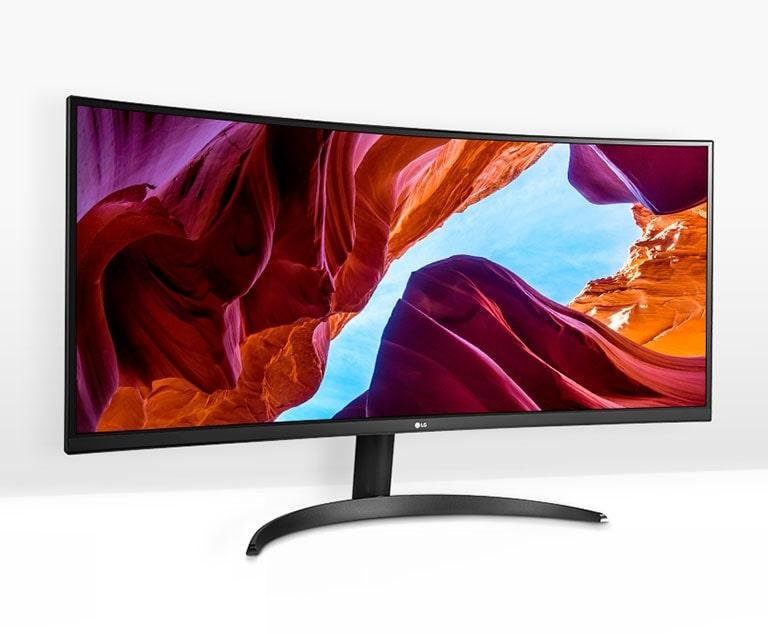
LG 34″ UltraWide Curved Monitor


Price
Around $350–$500
Why Ultrawide Monitors Are Great
Ultrawide monitors are excellent for multitasking because they can replace dual-monitor setups.
They’re ideal for:
- Coding
- Financial work
- Spreadsheet management
- Video timelines
- Productivity workflows
LG ultrawide displays are particularly popular among MacBook users because macOS handles ultrawide scaling very well.
Key Features
- 34-inch curved display
- 21:9 aspect ratio
- USB-C support
- WQHD resolution
- 100Hz refresh rate
Pros
- Huge workspace
- Great multitasking experience
- Excellent value
- Immersive design
Cons
- Lower pixel density than 5K
- Not ideal for color-critical editing
Best Budget 4K Monitor for MacBook Air
LG UltraFine 27US500-W


Price
Around $250–$350
Why It’s Great for Budget Buyers
If you want sharp 4K visuals without spending over $1,000, the LG UltraFine 27US500-W is an excellent choice.
It offers:
- Crisp 4K resolution
- Good color quality
- Slim bezels
- Reliable macOS compatibility
This monitor is perfect for students, home office users, and casual creators.
Key Features
- 27-inch 4K IPS panel
- HDR10 support
- Slim design
- Good color performance
Pros
- Excellent value
- Sharp image quality
- Affordable pricing
- Lightweight design
Cons
- No Thunderbolt support
- Basic USB hub features
Best Large-Screen Monitor for MacBook Pro
Dell UltraSharp 32 4K USB-C Hub Monitor


Price
Around $700–$900
Why Professionals Love It
A 32-inch monitor gives you massive workspace for:
- Video editing
- Coding
- Research
- Trading
- Productivity
Dell’s UltraSharp series offers excellent ergonomics, color accuracy, and connectivity for professional users.
Pros
- Huge screen space
- Excellent USB-C connectivity
- Strong ergonomics
- Professional-grade image quality
Cons
- Requires a large desk
- More expensive than smaller 4K displays
Best Budget Ultrawide Monitor
Acer Ultrawide Curved Monitor


Price
Around $250–$400
Why It’s a Good Budget Option
If you want the immersive experience of an ultrawide monitor without spending too much, Acer offers excellent value.
It’s ideal for:
- Productivity
- Entertainment
- Multitasking
- Casual gaming
Pros
- Affordable
- Large immersive display
- Great multitasking capabilities
Cons
- Average color accuracy
- Lower sharpness than 4K monitors
Product Comparison Table
| Monitor | Resolution | Screen Size | Connectivity | Best For | Approx Price |
|---|---|---|---|---|---|
| Apple Studio Display | 5K | 27-inch | Thunderbolt | Premium Mac setup | $1,599 |
| Dell UltraSharp U3225QE | 4K | 32-inch | Thunderbolt | Productivity | $850–$1,000 |
| BenQ MA320U | 4K | 32-inch | USB-C | Creative work | $700–$800 |
| Samsung ViewFinity S9 | 5K | 27-inch | Thunderbolt 4 | 5K alternative | $1,200–$1,300 |
| LG 34″ UltraWide | WQHD | 34-inch | USB-C | Multitasking | $350–$500 |
| LG UltraFine 27US500-W | 4K | 27-inch | HDMI/USB-C | Budget users | $250–$350 |
| Dell UltraSharp 32 Hub | 4K | 32-inch | USB-C | Office professionals | $700–$900 |
| Acer Ultrawide Curved | WQHD | 34-inch | HDMI/USB-C | Budget ultrawide | $250–$400 |
What to Look for in a Monitor for MacBook
1. Resolution
MacBooks feature sharp Retina displays, so low-resolution monitors can appear blurry.
Recommended Resolutions
- 4K for 27–32 inch displays
- 5K for Retina-quality sharpness
- Ultrawide WQHD for multitasking
2. USB-C or Thunderbolt Connectivity
USB-C and Thunderbolt monitors simplify your setup by supporting:
- Video output
- Charging
- Audio
- Data transfer
A single cable can handle everything.
3. Power Delivery
Your monitor should provide enough charging power for your MacBook.
Recommended Charging
| MacBook Model | Recommended Power |
|---|---|
| MacBook Air | 45W–65W |
| 14-inch MacBook Pro | 90W+ |
| 16-inch MacBook Pro | 96W+ |
4. Color Accuracy
For photographers and creators:
- Look for 95%+ DCI-P3 coverage
- Factory calibration is important
- IPS and OLED panels are best
5. macOS Compatibility
Not all monitors scale perfectly with macOS.
The best monitors for macOS scaling include:
- Apple Studio Display
- Dell UltraSharp
- LG UltraFine
- Samsung ViewFinity
Best Monitor Sizes for Different Users
| Use Case | Recommended Size |
|---|---|
| Students & Basic Work | 24–27 inch |
| Productivity & Coding | 27–32 inch |
| Video Editing | 32 inch |
| Ultrawide Productivity | 34–40 inch |
| Portable Setup | 14–16 inch |
Should You Buy a 4K or 5K Monitor?
Choose 4K If:
- You want better value
- You’re on a budget
- You prefer larger screen sizes
Choose 5K If:
- You want Retina-level sharpness
- You work with creative applications
- You spend long hours reading text
Best Monitors by User Type
Best for Students
LG UltraFine 27US500-W
Best for Office Productivity
Dell UltraSharp U3225QE
Best for Video Editing
BenQ MA320U
Best Premium Experience
Apple Studio Display
Best for Multitasking
LG 34″ UltraWide Curved
Best Apple Alternative
Samsung ViewFinity S9
Final Verdict
The best external monitor for your MacBook depends on your workflow, budget, and setup preferences.
- Choose the Apple Studio Display if you want the best overall Mac experience.
- Pick the Dell UltraSharp U3225QE for productivity and value.
- Go with the BenQ MA320U for creative work.
- Choose an LG ultrawide if multitasking is your priority.
- Budget users can still enjoy excellent 4K quality with LG UltraFine monitors.
A high-quality monitor can dramatically improve productivity, comfort, and your overall MacBook experience — especially if you spend hours working, editing, or multitasking every day.