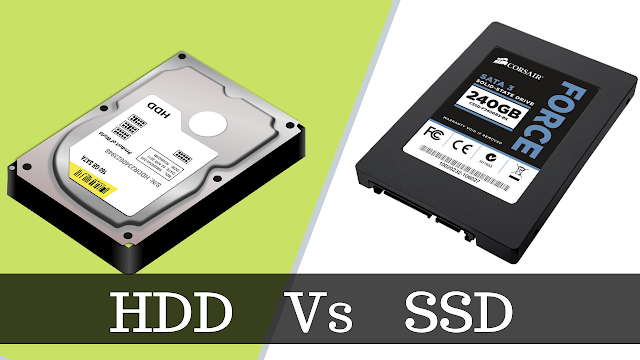
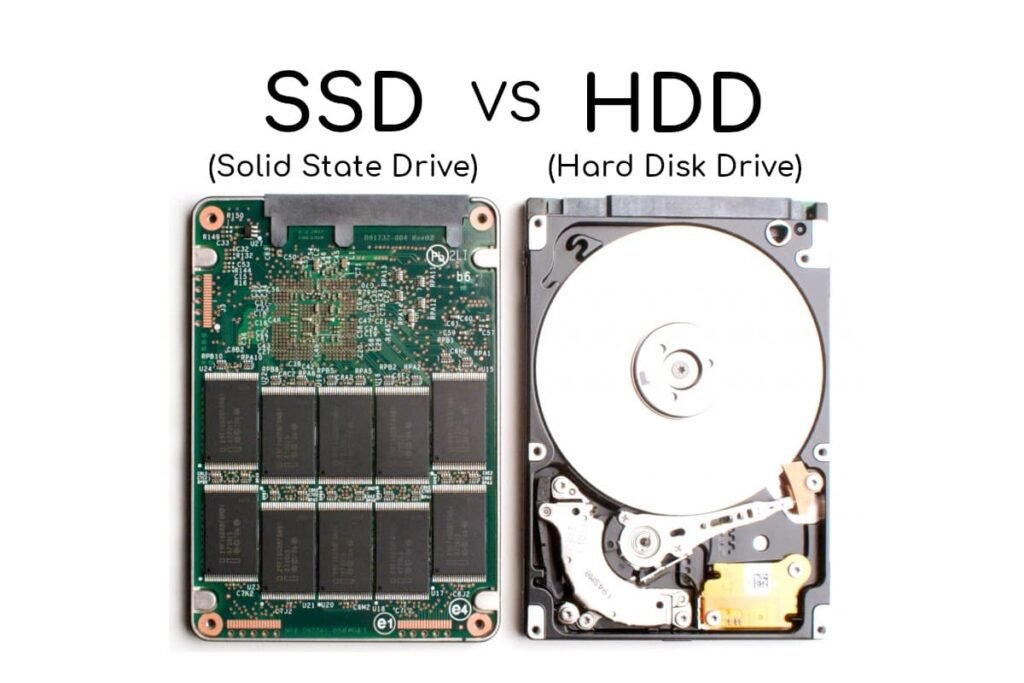
In 2026, SSDs are faster than ever, but HDDs still win on raw capacity and cost per gigabyte. This deep-dive compares NVMe, SATA, PCIe 5.0 SSDs, and modern HDDs (SMR/CMR/ HAMR), explains price trends, real-world performance, endurance, and gives clear buying recommendations for gamers, creators, laptop users, and bulk-storage needs.
Updated: February 7, 2026 — this guide uses market and product trends observed through late-2025 and early-2026 sources to give actionable advice for buyers today.
TL;DR (Quick summary)
- If you want speed (boot times, app load, game load, content creation): buy an SSD — NVMe (PCIe 4.0/5.0) if your system supports it.
- If you need mass storage for backups, media archives, or cheap TBs: HDDs still give the best cost per GB.
- In early 2026 NAND shortages pushed SSD prices up; expect fluctuations — check price trackers before buying.
- For most users: a small to medium NVMe SSD (500GB–2TB) for OS/apps + an HDD (4TB–20TB) for bulk storage is the best value mix.
- PCIe 5.0 delivers huge sequential throughput — great for large file transfers and professional workflows — but it’s not necessary for everyday computing.
Table of contents
- Why storage choice still matters in 2026
- What changed since 2020–2024: tech & market shifts
- SSD basics (NAND types, controllers, form factors)
- HDD basics (PMR/CMR vs SMR, HAMR, helium drives)
- Real-world performance: where SSDs shine — and where they don’t
- Price and value (price-per-GB, endurance, TCO) — 2026 snapshot
- Heat, power, and reliability considerations
- Use-case buying guides (Laptop, Desktop, Gaming, Creator, NAS, Backup)
- Migration & setup tips (cloning, partitioning, caching)
- Future outlook: 2026–2030 (what to expect)
- FAQs (short answers)
- Final verdict & recommended configurations
1) Why storage choice still matters in 2026
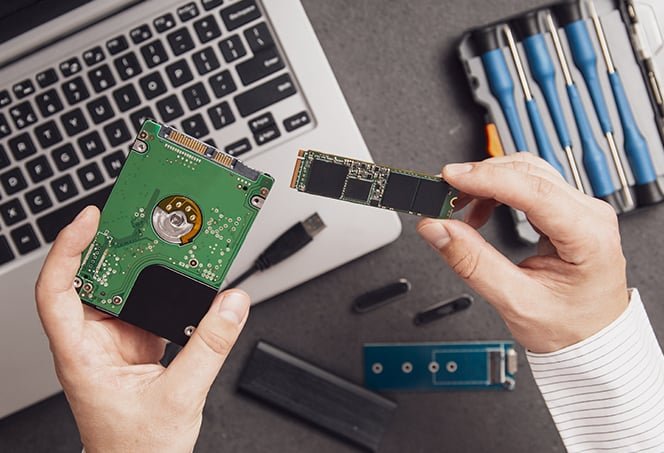
Storage is the foundation of every computing experience. Faster storage shortens boot times, reduces app and game load latency, improves responsiveness when editing huge files, and accelerates VM and database workloads. Cheaper storage enables larger datasets and archives at lower cost.
But “faster” isn’t always the same as “better value.” While SSDs continue to push performance boundaries, HDDs also evolved (higher density platters, HAMR, helium-sealed designs). That means the choice in 2026 is more nuanced: performance, capacity, endurance, and price must be balanced against your needs. Recent market disruptions (notably NAND supply strains driven by AI/data-center demand) have also impacted SSD pricing — an important factor for buyers today.
2) What changed since 2020–2024: key tech & market shifts
A quick timeline of relevant shifts that shape the 2026 decision:
- NVMe took over: NVMe M.2 drives became the norm for consumer OS/storage drives; SATA SSDs are now largely legacy for low-end or specific compatibility cases.
- PCIe 5.0 consumer SSDs arrived: Offering sequential speeds many times faster than SATA and even PCIe 4.0 — useful for bulk transfers and heavy professional workloads. Early flagship PCIe 5.0 consumer drives (e.g., Crucial T705 / similar) demonstrate extreme throughput in 2025–2026 reviews.
- NAND shortages & price volatility (early 2026): Demand from AI/data centers tightened NAND supply, causing some brands to raise retail SSD prices sharply in early 2026. Trackers show spotty availability and higher-than-expected MSRPs for larger SSD capacities.
- HDD capacity advances continue: High-capacity HDDs (18–24TB and beyond) remain the cost-effective choice for cold storage and nearline storage; market forecasts show growth in enterprise/nearline HDD shipments. HAMR technology and helium drives keep increasing areal density.
3) SSD basics: NAND types, endurance, controllers, and form factors
NAND types — what they mean for you
- SLC (single-level cell): Fastest and most durable — used in enterprise or cache layers; expensive.
- MLC (multi-level cell): Two bits per cell; balance of speed/endurance (rare in mainstream consumer drives now).
- TLC (triple-level cell): Three bits per cell; the mainstream sweet spot for consumer drives in 2026 — good endurance/price.
- QLC (four-level cell) & PLC (penta-level cell): Higher density, cheaper per GB, but lower endurance and slower sustained writes — great for read-heavy and archive use, not ideal for constant heavy rewriting.
What to pick: For an OS/primary drive, prefer TLC or higher-quality QLC with overprovisioning and good controller firmware. For cheap mass NVMe storage, QLC/PLC is acceptable if you understand write endurance limits.
Controllers & firmware
The controller and firmware determine performance consistency, background garbage collection behavior, and TRIM handling. Premium controllers (and adequate DRAM/Host Memory Buffer support) make even QLC drives feel snappy in day-to-day use.
Form factors
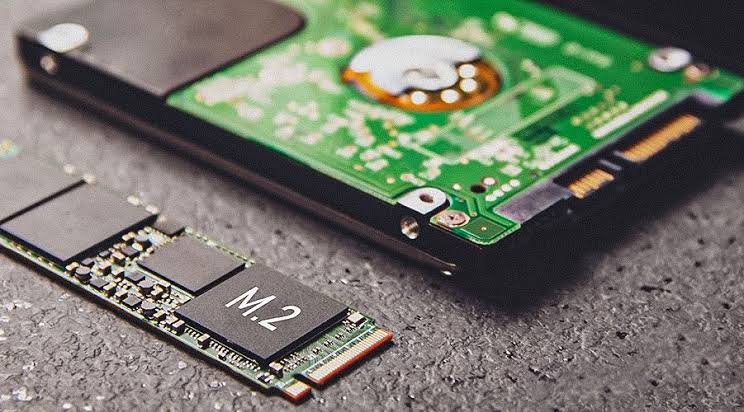
- M.2 NVMe (2280/2230) — the default consumer choice.
- U.2 / U.3 — used in workstations/servers.
- SATA 2.5″ — available for compatibility but largely eclipsed by NVMe for performance.
4) HDD basics: CMR vs SMR, HAMR, helium drives
Recording methods: CMR (Conventional/PMR) vs SMR (Shingled)
- CMR/PMR: Better random write performance — preferred for NAS and mixed workloads.
- SMR (Shingled): Higher density and lower cost per TB, but can be slow on random writes — often used in archival and cold-storage drives. Use carefully in NAS or mixed-write environments.
HAMR & helium drives
- HAMR (Heat-Assisted Magnetic Recording): Increasingly used in high-capacity HDDs to push areal density beyond limits of previous tech. This enables 20TB–24TB consumer and enterprise drives.
- Helium sealing: Reduces internal friction and allows more platters, improving capacity and efficiency.
What to pick: For NAS or desktop with mixed use, choose CMR/PMR drives (often marketed as “Pro” lines). For cold archive, SMR/HAMR high-capacity drives are a cost-efficient win.
5) Real-world performance: where SSDs shine — and where they don’t
SSD strengths (practical outcomes)
- Random IOPS & low latency: Booting OS, launching apps, and random-access tasks are orders of magnitude faster on SSDs. A typical NVMe SSD delivers thousands to millions of IOPS compared to dozens for HDDs.
- Game and app load times: SSDs reduce texture streaming and level load wait times — a noticeable real-world improvement for gaming and productivity.
- Content creation responsiveness: When editing high-resolution video or working with large asset libraries, SSDs significantly speed up scrubbing, exporting, and loading projects.
Where HDDs still work fine
- Sequential access & bulk storage costs: For archiving large numbers of media files or backups where throughput matters less than cost per TB, HDDs remain unbeatable.
- Long-term cold storage: Properly managed HDD arrays with rotation and redundancy are still a practical, economical archival option.
PCIe 5.0: who benefits?
PCIe 5.0 NVMe drives dramatically increase sequential transfer rates (multiple GB/s). That matters for:
- Moving multi-GB or TB-sized datasets frequently (video producers, large-scale scientific datasets).
- High-throughput server workloads and specialized professional tasks.
For most desktop users and gamers, the biggest practical benefit was already achieved by PCIe 4.0 and NVMe — PCIe 5.0 is overkill unless your workload includes very frequent multi-gigabyte transfers or specific pro apps that can saturate the interface.
6) Price and value — the 2026 snapshot
Price-per-GB: SSD vs HDD (what to expect in early 2026)
- HDDs: Still much cheaper per TB. Expect best-case consumer prices around a few cents per GB for high-capacity drives (depending on region and promotions). Enterprise/nearline drives cost more, but still lower than SSD per TB. Market outlooks show HDD demand for nearline applications remains robust into 2026.
- SSDs: Price volatility in early 2026 due to NAND constraints. Some consumer SSDs experienced significant MSP increases and spot price surges (brand-specific hikes reported in news). This makes timing and model selection important; track prices via price trackers and wait for deals if possible.
Example considerations
- A 1TB TLC NVMe SSD might normally be the sweet-spot for price/perf in prior years; in early 2026, you may find prices pushed higher — raising the relative attractiveness of 2TB deals or even hybrid setups.
- For archival 10TB–20TB storage needs, HDDs remain far cheaper overall, and their TCO (including power per TB) can be favorable for large-scale setups.
Endurance & warranty
- SSDs list TBW (Terabytes Written) and MTBF; higher TBW and multi-year warranties (3–5 years or more) signal a drive intended for heavier writes. TLC drives typically offer higher TBW than QLC.
- HDDs give specs in MTBF and workload ratings; for constant random writes, enterprise HDDs or NAS-specific CMR drives are better.
7) Heat, power, and reliability considerations
Thermal behavior
- NVMe SSDs (especially PCIe 5.0) can run hot under sustained heavy transfers. Many motherboards and PSUs expect M.2 drives to have heatsinks; desktop users should ensure airflow or use heatsinked models.
- HDDs tend to run cooler per TB in idle states but consume more power under continuous spin; modern helium-filled designs reduce power draw.
Power consumption
- For laptops and battery life, NVMe SSDs often have better power efficiency for active workloads (finishing tasks quickly then idle), but low-power SATA SSDs or carefully selected NVMe models might be necessary for ultra-long battery life devices.
Reliability & failure modes
- SSDs: Fail by exceeding program/erase cycles; wear leveling and spare area mitigate this. Sudden electrical events can cause firmware corruption. Backups remain essential.
- HDDs: Fail mechanically (bearing, head crashes). They can sometimes be more recoverable using specialized tools, but failures can be catastrophic. Regular SMART monitoring and RAID/backups are recommended.
8) Use-case buying guides (concrete recommendations)
Below are actionable recommendations tailored to common real-world users in 2026. For price-sensitive buyers, remember to check current pricing charts before purchasing — SSD prices are volatile this cycle.
A. Laptop users (everyday productivity and mobility)
- Buy: 500GB–1TB NVMe SSD (TLC preferred) as internal drive.
- Why: Fast boot, snappy app performance, good compromise between capacity and price. Choose a drive with moderate TBW and a 3–5 year warranty. If you need more storage, rely on external HDDs or cloud.
- Avoid: Large QLC-only drives if you frequently create or move tons of data.
B. Desktop users / general power users
- Primary (OS & apps): 1TB NVMe (TLC or quality QLC with DRAM/HMB).
- Secondary (games, scratch): 1–2TB NVMe or SATA SSD depending on budgets.
- Bulk: 8TB–20TB HDD (CMR/Pro lines) for media/storage.
- Why: Fast responsiveness for daily tasks, inexpensive bulk storage.
C. Gamers
- Buy: 1–2TB NVMe PCIe 4.0 is the most cost-effective for load speeds and storage. Consider PCIe 5.0 only if you want future-proof or have very high capacity/pro-level needs. For consoles like PS5, check the console’s approved drive list and thermals.
D. Video editors & creative pros (4K, 8K workflows)
- Buy: High-end NVMe SSDs — PCIe 5.0 if project workflows involve moving multi-GB files frequently, or a fast RAID 0/10 NVMe array. For archive, purchase high-capacity HDDs (20TB+) with proper redundancy.
E. NAS & home servers (media streaming, backups)
- Buy: CMR/Pro HDDs for main storage (4TB–20TB depending on needs). Use SSD cache if your NAS supports it to speed random access reads/writes. Avoid SMR drives in mixed-write NAS unless explicitly recommended by NAS vendor.
F. Backup & cold storage
- Buy: High-capacity HDDs (SMR or HAMR) in rotation, combined with cloud for critical off-site redundancy. HDDs are cheapest per TB.
9) Migration & setup tips
- Cloning OS to NVMe: Use reliable cloning tools (Macrium Reflect, Clonezilla, vendor tools). Ensure your BIOS/UEFI supports NVMe boot — you might need to switch SATA mode or enable NVMe support.
- Partitioning strategy: Keep OS and apps on a smaller fast NVMe; use separate SSD/HDD partitions for games, scratch, and archives.
- Overprovisioning: For SSDs, leaving 10–20% unallocated space can improve sustained performance and endurance.
- Backup plan: No matter how reliable, both SSDs and HDDs can fail — implement 3-2-1 backup rule (3 copies, 2 media, 1 off-site).
- SMART & monitoring: Enable health monitoring and check SMART stats periodically; for NAS, enable email alerts and regular scrubbing.
10) Future outlook: 2026–2030 (what to expect)
- NAND supply volatility may continue in 2026: Driven by AI and data-center demand; prices could stay elevated until production capacity catches up. Brands may prioritize enterprise clients, affecting consumer availability and pricing cycles.
- PCIe 5.0 to 6.0 evolution: PCIe 5.0 adoption will broaden; PCIe 6.0 specs are emerging but desktop adoption will take time. For the next few years, PCIe 4.0 and 5.0 will coexist with targeted use-cases for each.
- HDDs will push to higher TB counts: HAMR and other techniques will keep HDDs as the cost leader for bulk storage; 30TB+ drives for enterprise/nearline are likely by late decade.
11) FAQs (short, scannable answers)
Q: Is SSD always better than HDD?
A: Not always. SSDs are faster and more responsive; HDDs are cheaper per TB and better for cold storage. Choose based on need.
Q: Should I buy PCIe 5.0 SSD in 2026?
A: Buy PCIe 5.0 only if your workload needs extreme sequential throughput (pro content creators, large dataset transfers). For most users, PCIe 4.0 NVMe remains excellent and often better value.
Q: Are SATA SSDs dead?
A: Mostly relegated to legacy systems and niche low-cost upgrades. NVMe is the standard for new systems.
Q: Is QLC SSD okay for gaming?
A: Yes — for read-heavy workloads and game installs it works. But be cautious if you perform heavy sustained writes (video editing, large file transfers). Look for drives with good caching and warranty.
Q: How urgent is price tracking for SSD purchases in 2026?
A: Very. Early-2026 saw sharp price rises for some models due to NAND shortages; check live price trackers and flash-sale windows.
12) Final verdict — recommended configs (2026)
Below are practical build suggestions across budgets and uses. Adjust capacity based on your personal data needs and the current prices you see.
a) Budget laptop / student — best value
- Drive: 512GB NVMe TLC (or dependable QLC with DRAM if price is much lower)
- Why: Fast bootand app load; affordable.
b) Mainstream desktop — best all-rounder
- Drive 1 (OS): 1TB NVMe TLC (PCIe 4.0)
- Drive 2 (bulk): 8TB CMR HDD (for media/backups)
- Why: Balance between speed and storage cost.
c) Gamer — sweet spot
- Drive: 1–2TB NVMe PCIe 4.0 (or PCIe 5.0 if you want future proofing / can afford it)
- Extras: External HDD backup for captures/archives.
d) Creator / Pro workstation
- Primary: 2TB+ NVMe PCIe 5.0 or a RAID of high-end NVMe drives for scratch and working files.
- Archive: 20TB+ HDDs (HAMR/Cooled Pro models) in RAID/ZFS with off-site backup.
e) NAS / media server
- Drives: 2x or more CMR NAS drives (4TB–20TB) depending on size; add SSD cache if needed. Avoid SMR for mixed-write NAS except when recommended.
Sources & further reading
- Tom’s Hardware — article on early-2026 SSD price hikes and market impact.
- Tom’s Hardware — best SSDs 2026 and PCIe 5.0 coverage (product & performance reviews).
- Tom’s Hardware — SSD price tracking page (live price guidance).
- Intel Market Research / market reports on high-capacity HDD trend and 22TB outlook.
- Articles on PCIe 5.0 tradeoffs and real-world utility.
- Guides explaining NAND types (TLC/QLC/PLC) and endurance trade-offs.
- NAS/hard drive communities and lists documenting CMR vs SMR differences for real-world NAS compatibility.
Closing — how I’d choose if I were you
If you want a single, clear recommendation for most users in early 2026:
- Primary drive (OS/apps/games): 1TB NVMe SSD (TLC) — gives the best balance of speed, endurance, and value.
- Secondary drive (archive/backups): One or more HDDs (CMR/Pro lines) sized to your dataset (4TB–20TB).
- If you work professionally with huge files: Consider PCIe 5.0 NVMe(s) for scratch and high-speed transfers and invest in high-capacity HDDs for long-term archives.
Finally — because prices are a bit unpredictable this cycle — check live price trackers before you buy, and don’t hesitate to wait for a verified deal on a well-reviewed SSD model if your need is not urgent.